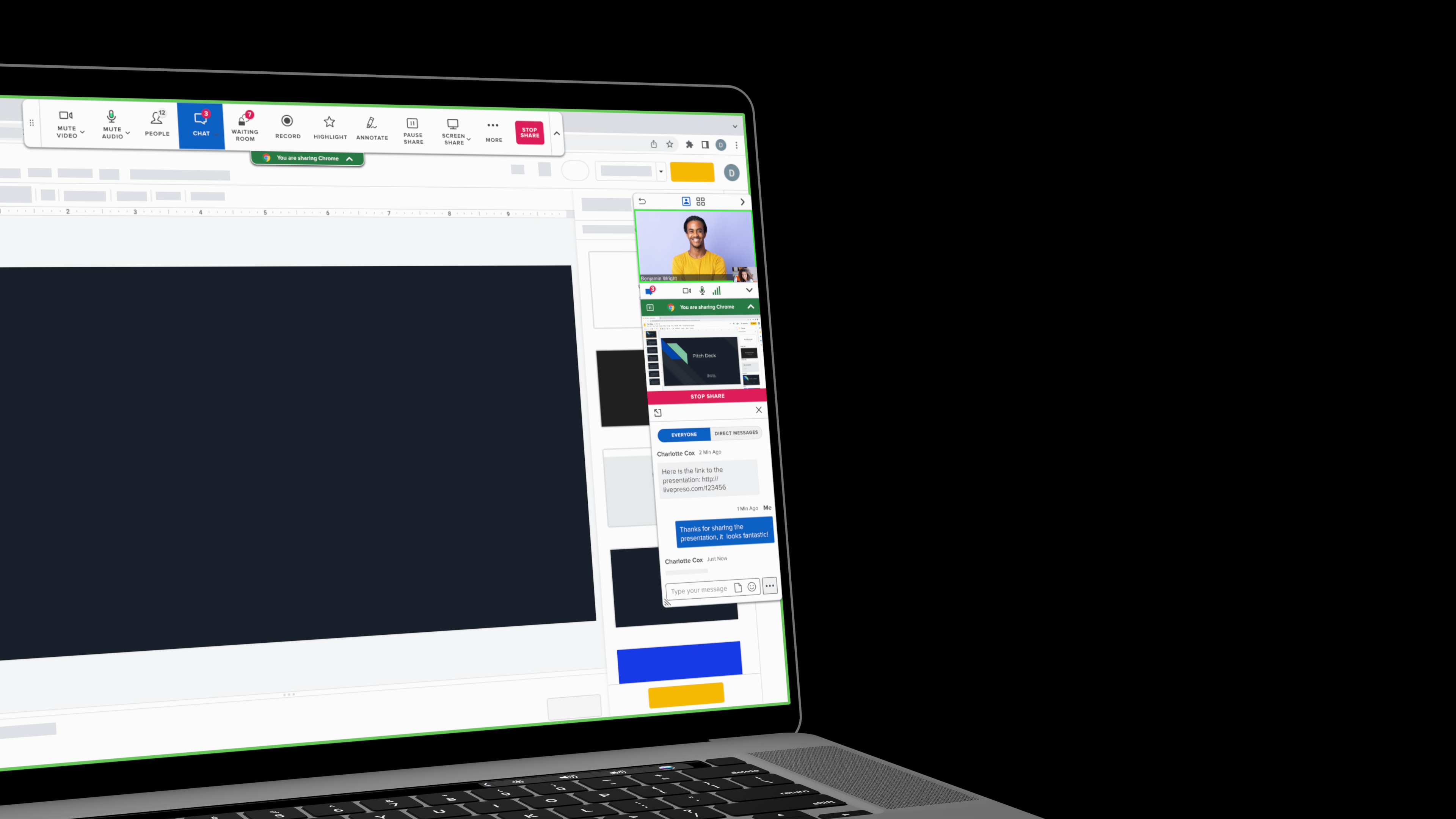
macbook showing closeup interface of BlueJeans screensharing controls with the chat window open

BlueJeans by Verizon

Problem

Enterprise video platforms accumulate complexity fast, and BlueJeans was no exception. Across both Meetings and Studio, feature-rich interfaces created friction for users trying to accomplish focused tasks, from presenting on a single screen to going live with confidence.

Solution

Two focused efforts targeting the highest-friction moments on each surface — streamlining screenshare controls for single-screen users, and giving live presenters a way to preview slides and notes without disrupting the broadcast.

BlueJeans Meetings

Screensharing Controls
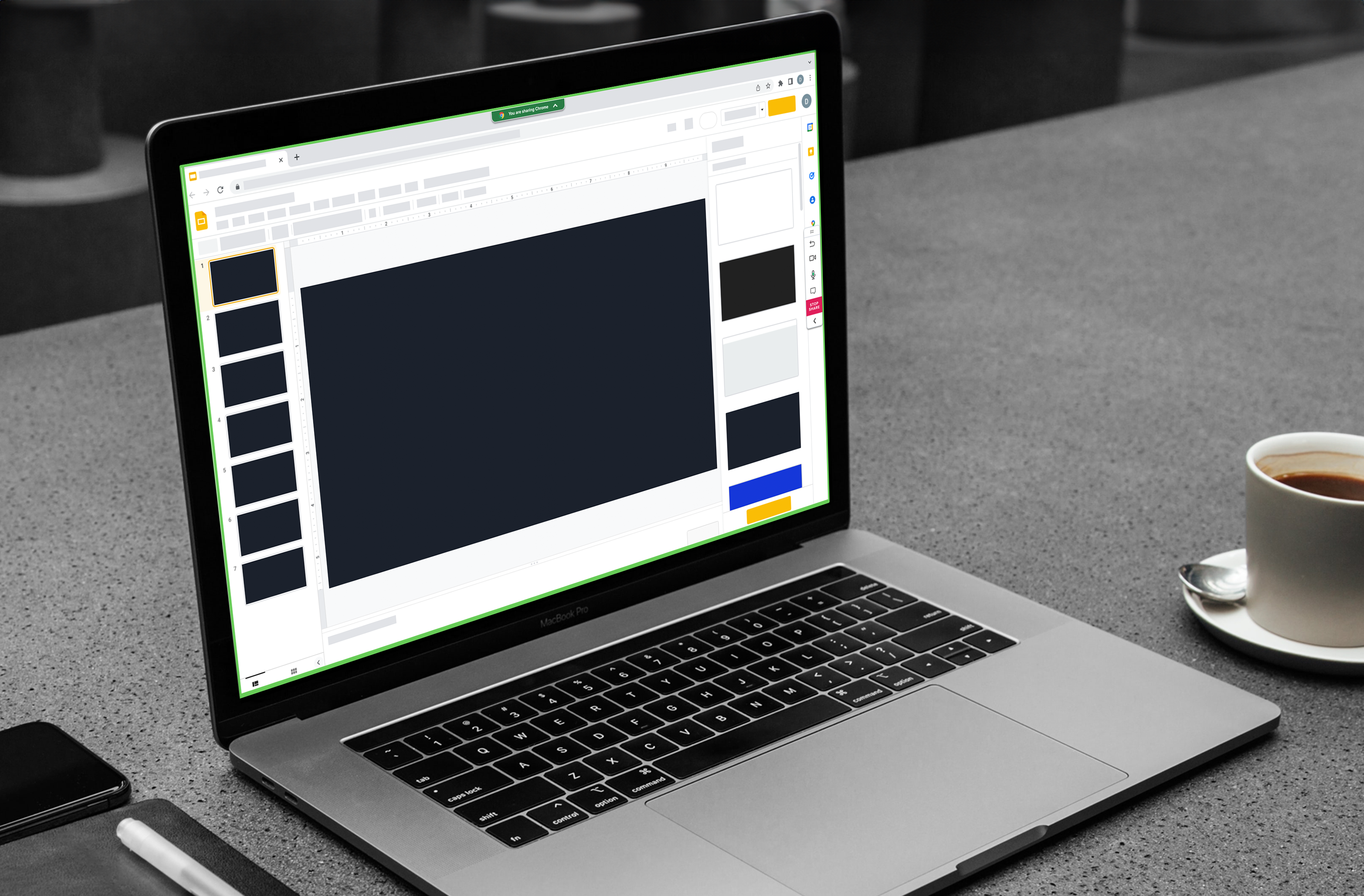
iMac mockup of BlueJeans screenshare controls, GIF
mockup of macbook pro with BlueJeans screenshare controls in focus mode for single screen use

Why This Matters

Work that improved both the user experience and the team delivering it, measured across quality, efficiency, and research validation.

Every major initiative

Backed by user research and usability testing before engineering handoff

50% improvement

in design-to-engineering efficiency through clearer specs and cross-functional collaboration

Measurable Quality gains

across key meeting experiences, validated through Q score tracking

BlueJeans Studio
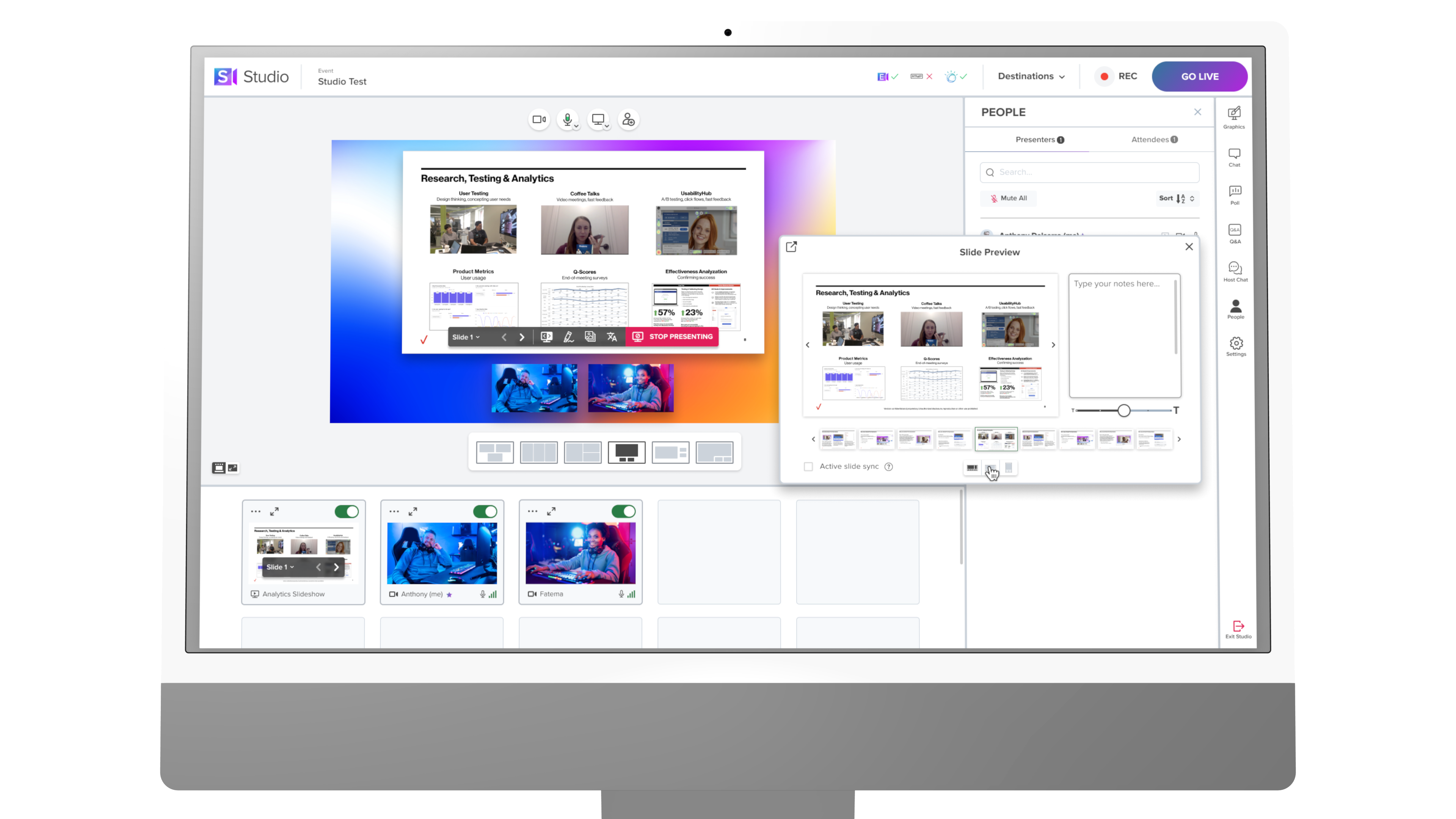
iMac mockup of BlueJeans studio slide preview interface

Live Event Hosting Tools

On the Studio side, the work centered on reducing operational complexity for live event hosts and presenters — letting them focus on delivering content rather than managing the broadcast.
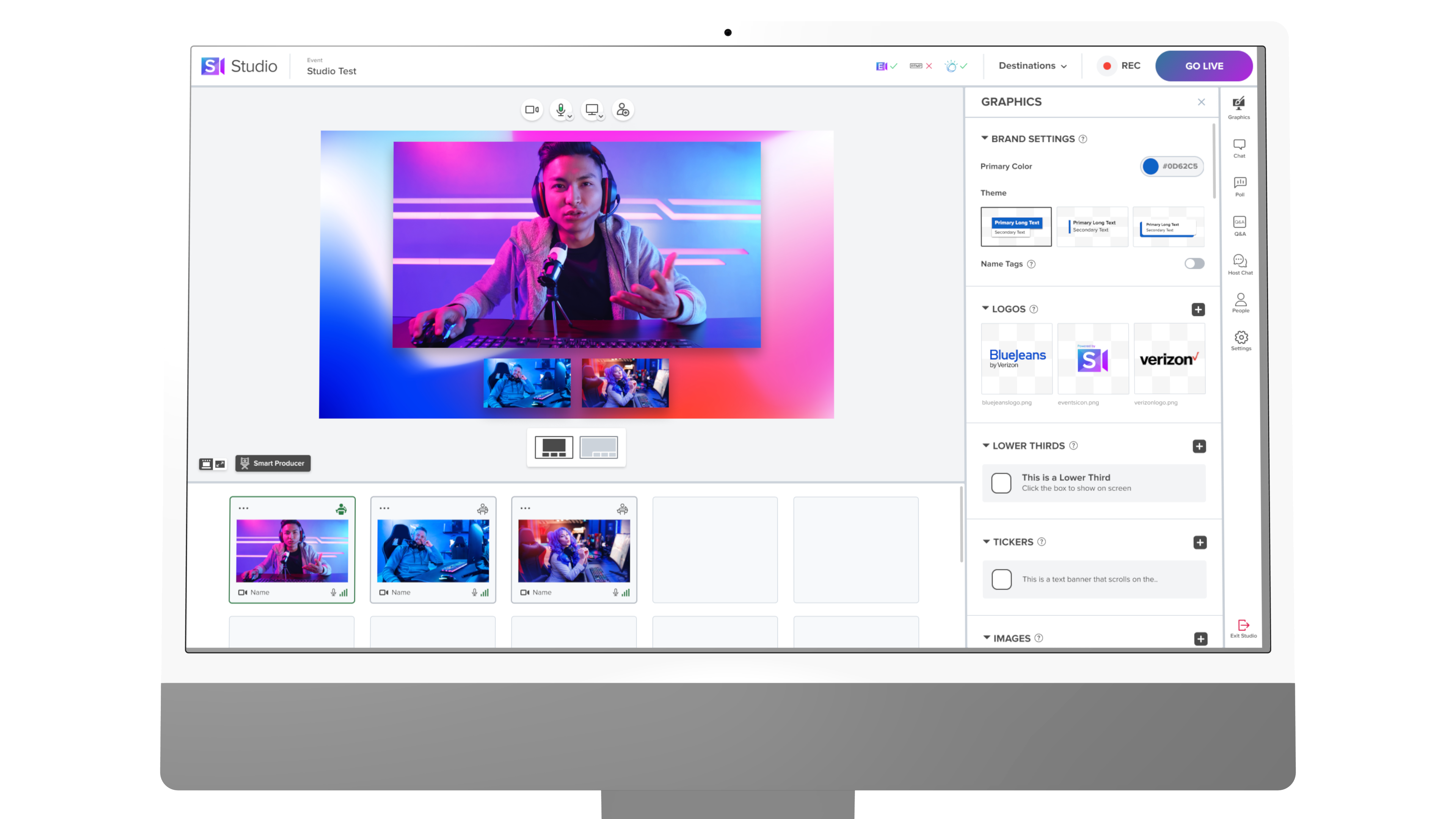
BlueJeans Studio Active Speaker in action

Why This Matters

Live event production is cognitively demanding — hosts juggle participants, slides, timing, and audience engagement simultaneously. These tools were designed to remove that burden, letting presenters show up as presenters rather than producers.

Role

UX Designer III: interaction design, prototyping, design specs, and cross-functional collaboration with product and engineering across Meetings and Studio.

(914) 255-7392

dillonhickey07@gmail.com

Dillon Hickey

Pierview Design Inc. © 2025 All Rights Reserved

macbook showing closeup interface of BlueJeans screensharing controls with the chat window open

BlueJeans by Verizon

At BlueJeans, I worked across two distinct product surfaces, Meetings and Studio, within a complex enterprise video and live-streaming platform. The work that follows reflects two focused efforts: streamlining the screensharing experience for single-screen users, and giving live presenters the tools to perform with confidence.

Problem

Enterprise video platforms accumulate complexity fast, and BlueJeans was no exception. Across both Meetings and Studio, feature-rich interfaces created friction for users trying to accomplish focused tasks, from presenting on a single screen to going live with confidence.

Solution

Two focused efforts targeting the highest-friction moments on each surface — streamlining screenshare controls for single-screen users, and giving live presenters a way to preview slides and notes without disrupting the broadcast.

BlueJeans Meetings

Screensharing Controls

iMac mockup of BlueJeans screenshare controls, GIF
mockup of macbook pro with BlueJeans screenshare controls in focus mode for single screen use

Why This Matters

Work that improved both the user experience and the team delivering it, measured across quality, efficiency, and research validation.

Every major initiative

Backed by user research and usability testing before engineering handoff

50% improvement

in design-to-engineering efficiency through clearer specs and cross-functional collaboration

Measurable Quality gains

across key meeting experiences, validated through Q score tracking

BlueJeans Studio

iMac mockup of BlueJeans studio slide preview interface

Live Event Hosting Tools

On the Studio side, the work centered on reducing operational complexity for live event hosts and presenters — letting them focus on delivering content rather than managing the broadcast.

BlueJeans Studio Active Speaker in action

Why This Matters

Live event production is cognitively demanding — hosts juggle participants, slides, timing, and audience engagement simultaneously. These tools were designed to remove that burden, letting presenters show up as presenters rather than producers.

Role

UX Designer III: interaction design, prototyping, design specs, and cross-functional collaboration with product and engineering across Meetings and Studio.

About

Work

(914) 255-7392

dillonhickey07@gmail.com

Dillon Hickey

Pierview Design Inc. © 2025 All Rights Reserved

macbook showing closeup interface of BlueJeans screensharing controls with the chat window open

BlueJeans by Verizon

At BlueJeans, I worked across two distinct product surfaces, Meetings and Studio, within a complex enterprise video and live-streaming platform. The work that follows reflects two focused efforts: streamlining the screensharing experience for single-screen users, and giving live presenters the tools to perform with confidence.

Problem

Enterprise video platforms accumulate complexity fast, and BlueJeans was no exception. Across both Meetings and Studio, feature-rich interfaces created friction for users trying to accomplish focused tasks, from presenting on a single screen to going live with confidence.

Solution

Two focused efforts targeting the highest-friction moments on each surface — streamlining screenshare controls for single-screen users, and giving live presenters a way to preview slides and notes without disrupting the broadcast.

BlueJeans Meetings

Screensharing Controls

iMac mockup of BlueJeans screenshare controls, GIF
mockup of macbook pro with BlueJeans screenshare controls in focus mode for single screen use

Why This Matters

Work that improved both the user experience and the team delivering it, measured across quality, efficiency, and research validation.

50% improvement

in design-to-engineering efficiency through clearer specs and cross-functional collaboration

Measurable Quality gains

across key meeting experiences, validated through Q score tracking

Every major initiative

Backed by user research and usability testing before engineering handoff

BlueJeans Studio

iMac mockup of BlueJeans studio slide preview interface

Live Event Hosting Tools

On the Studio side, the work centered on reducing operational complexity for live event hosts and presenters — letting them focus on delivering content rather than managing the broadcast.

BlueJeans Studio Active Speaker in action

Why This Matters

Live event production is cognitively demanding — hosts juggle participants, slides, timing, and audience engagement simultaneously. These tools were designed to remove that burden, letting presenters show up as presenters rather than producers.

Role

UX Designer III: interaction design, prototyping, design specs, and cross-functional collaboration with product and engineering across Meetings and Studio.