
hand gesture controls for focus, hero image

Hand Gesture Controls for Focus

Problem

In today’s tech-driven world, overwhelming clutter leads to unfocused users, impacting mental health and productivity. Current operating systems lack built-in focus features, causing attention deficits and decreased efficiency.

Solution

The intent-driven spatial operating system simplifies interactions, minimizing distractions and reinforcing user intent. By decluttering the digital environment, it enhances productivity and mental well-being, addressing challenges caused by technological overload.

The Concept

Intent-driven spatial computing reframes familiar gestures (pinch-to-zoom, push-and-pull, swipe) as focus mechanisms rather than just navigation controls. By immersing users in their current task and mitigating ambient distractions at the OS level, the system trains subconscious focus rather than demanding conscious effort.
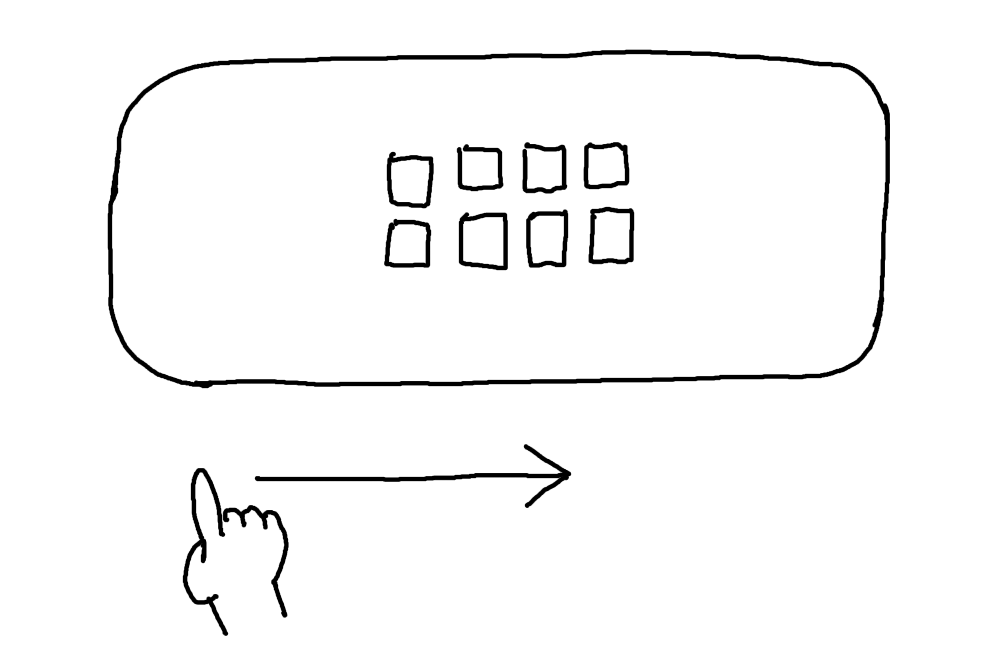
Hand gesture controls for focus, full flow, step 1

A user swipes to activate the OS, overlaying a homepage-style interface of their most visited applications.

Hand gesture controls for focus, full flow, step 2

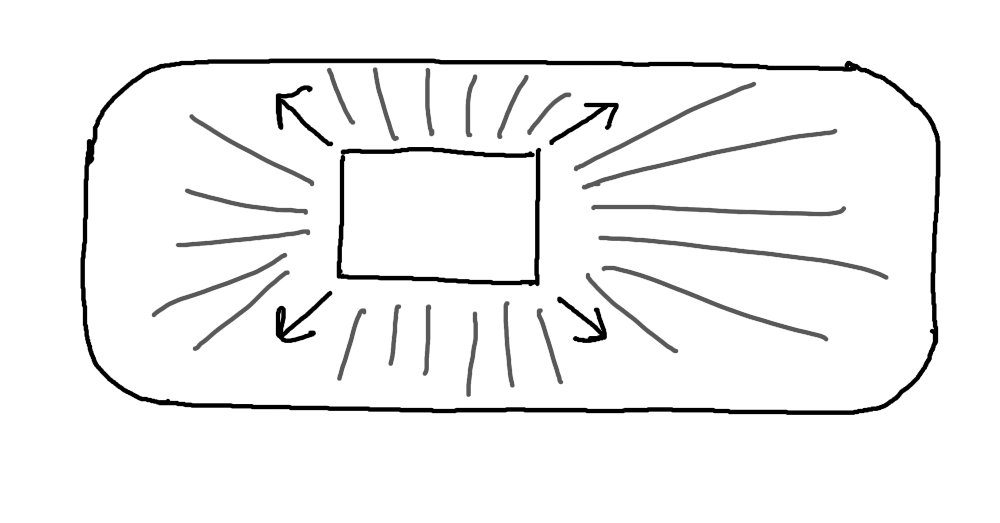
The user would then “pinch-and-zoom in” to launch the immersive experience of entering an app, subconsciously clearing all distractions around them both at an OS level and a physical world level.

Hand gesture controls for focus, full flow, step 3
Hand gesture controls for focus, full flow, step 4
Hand gesture controls for focus, full flow, step 5

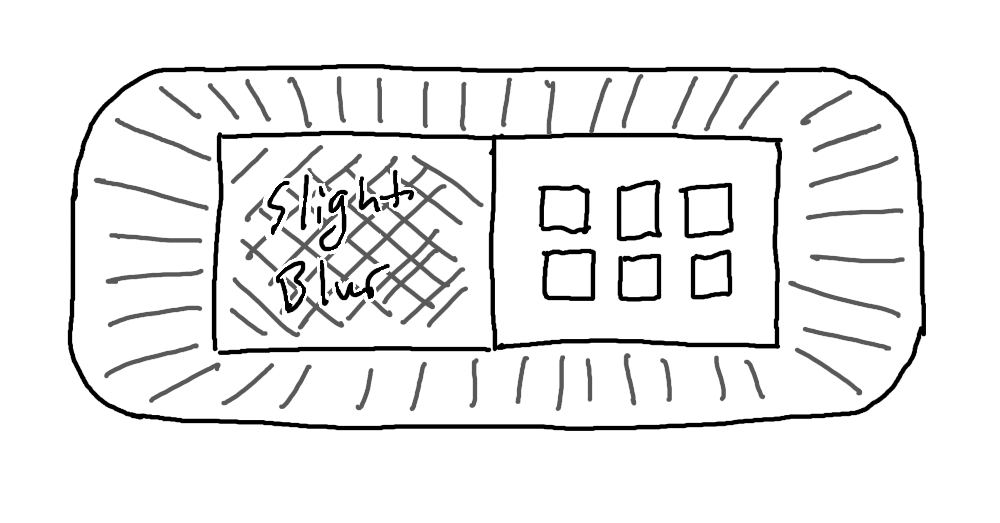
The user could then use the app in focus, and when needing to change activities, they can swipe on the edge of the window to reopen the homepage-style interface, side by side with the open window.
Hand gesture controls for focus, full flow, step 6

Blurs based on the Z position of the windows could be utilized to maintain focus on the current task, and pushing and pulling hand gestures can alter the Z position of the open windows. Swiping a window away can close it.


Hand gesture controls for focus, full flow, step 7
Hand gesture controls for focus, full flow, step 8
Hand gesture controls for focus, full flow, step 9

Finally, a user could “pinch-and-zoom-out” to return to the homepage-style interface of applications. Future iterations could explore eye tracking and face direction as a more sophisticated and streamlined approach to maintaining focus screens.

Why this matters

Attention deficits, depression, and digital burnout aren't personal failures — they're design failures. Operating systems built around engagement metrics and time-on-platform have quietly optimized against the very users they serve.


Intent-driven spatial computing flips that model. By building focus into the interaction layer rather than making it an opt-in feature, the system works with human behavior instead of exploiting it.


The biggest barrier isn't technical — it's economic. Helping users focus means helping them spend less time doom scrolling, which directly threatens the profitability models of the platforms that control the hardware. That tension is worth naming, because solving it requires more than clever UX. It requires a different set of values at the product level.

(914) 255-7392

dillonhickey07@gmail.com

Dillon Hickey

Pierview Design Inc. © 2025 All Rights Reserved

hand gesture controls for focus, hero image

Hand Gesture Controls for Focus

Problem

In today’s tech-driven world, overwhelming clutter leads to unfocused users, impacting mental health and productivity. Current operating systems lack built-in focus features, causing attention deficits and decreased efficiency.

Solution

The intent-driven spatial operating system simplifies interactions, minimizing distractions and reinforcing user intent. By decluttering the digital environment, it enhances productivity and mental well-being, addressing challenges caused by technological overload.

The Concept

Intent-driven spatial computing reframes familiar gestures (pinch-to-zoom, push-and-pull, swipe) as focus mechanisms rather than just navigation controls. By immersing users in their current task and mitigating ambient distractions at the OS level, the system trains subconscious focus rather than demanding conscious effort.

Hand gesture controls for focus, full flow, step 1

A user swipes to activate the OS, overlaying a homepage-style interface of their most visited applications.

Hand gesture controls for focus, full flow, step 2

The user would then “pinch-and-zoom in” to launch the immersive experience of entering an app, subconsciously clearing all distractions around them both at an OS level and a physical world level.

Hand gesture controls for focus, full flow, step 3
Hand gesture controls for focus, full flow, step 4
Hand gesture controls for focus, full flow, step 5

The user could then use the app in focus, and when needing to change activities, they can swipe on the edge of the window to reopen the homepage-style interface, side by side with the open window.

Hand gesture controls for focus, full flow, step 6

Blurs based on the Z position of the windows could be utilized to maintain focus on the current task, and pushing and pulling hand gestures can alter the Z position of the open windows. Swiping a window away can close it.

Hand gesture controls for focus, full flow, step 7
Hand gesture controls for focus, full flow, step 8
Hand gesture controls for focus, full flow, step 9

Finally, a user could “pinch-and-zoom-out” to return to the homepage-style interface of applications. Future iterations could explore eye tracking and face direction as a more sophisticated and streamlined approach to maintaining focus screens.

Why this matters

Attention deficits, depression, and digital burnout aren't personal failures — they're design failures. Operating systems built around engagement metrics and time-on-platform have quietly optimized against the very users they serve.


Intent-driven spatial computing flips that model. By building focus into the interaction layer rather than making it an opt-in feature, the system works with human behavior instead of exploiting it.


The biggest barrier isn't technical — it's economic. Helping users focus means helping them spend less time doom scrolling, which directly threatens the profitability models of the platforms that control the hardware. That tension is worth naming, because solving it requires more than clever UX. It requires a different set of values at the product level.

About

Work

(914) 255-7392

dillonhickey07@gmail.com

Dillon Hickey

Pierview Design Inc. © 2025 All Rights Reserved

hand gesture controls for focus, hero image

Hand Gesture Controls for Focus

Problem

In today’s tech-driven world, overwhelming clutter leads to unfocused users, impacting mental health and productivity. Current operating systems lack built-in focus features, causing attention deficits and decreased efficiency.

Solution

The intent-driven spatial operating system simplifies interactions, minimizing distractions and reinforcing user intent. By decluttering the digital environment, it enhances productivity and mental well-being, addressing challenges caused by technological overload.

The Concept

Intent-driven spatial computing reframes familiar gestures (pinch-to-zoom, push-and-pull, swipe) as focus mechanisms rather than just navigation controls. By immersing users in their current task and mitigating ambient distractions at the OS level, the system trains subconscious focus rather than demanding conscious effort.

Hand gesture controls for focus, full flow, step 1

A user swipes to activate the OS, overlaying a homepage-style interface of their most visited applications.

Hand gesture controls for focus, full flow, step 2

The user would then “pinch-and-zoom in” to launch the immersive experience of entering an app, subconsciously clearing all distractions around them both at an OS level and a physical world level.

Hand gesture controls for focus, full flow, step 3
Hand gesture controls for focus, full flow, step 4
Hand gesture controls for focus, full flow, step 5

The user could then use the app in focus, and when needing to change activities, they can swipe on the edge of the window to reopen the homepage-style interface, side by side with the open window.

Hand gesture controls for focus, full flow, step 6

Blurs based on the Z position of the windows could be utilized to maintain focus on the current task, and pushing and pulling hand gestures can alter the Z position of the open windows. Swiping a window away can close it.

Hand gesture controls for focus, full flow, step 7
Hand gesture controls for focus, full flow, step 8
Hand gesture controls for focus, full flow, step 9

Finally, a user could “pinch-and-zoom-out” to return to the homepage-style interface of applications. Future iterations could explore eye tracking and face direction as a more sophisticated and streamlined approach to maintaining focus screens.

Why this matters

Attention deficits, depression, and digital burnout aren't personal failures — they're design failures. Operating systems built around engagement metrics and time-on-platform have quietly optimized against the very users they serve.


Intent-driven spatial computing flips that model. By building focus into the interaction layer rather than making it an opt-in feature, the system works with human behavior instead of exploiting it.


The biggest barrier isn't technical — it's economic. Helping users focus means helping them spend less time doom scrolling, which directly threatens the profitability models of the platforms that control the hardware. That tension is worth naming, because solving it requires more than clever UX. It requires a different set of values at the product level.